
Download Clap Counter APK – clap counter, sound event counter, clap detection, sound level monitor, audio counter, free sound app, Android app, count claps
Overview
Clap Counter is a lightweight Android application designed to count claps or other sound events through real-time microphone monitoring. The app serves as a simple yet effective tool for users who need to track auditory signals in various environments. Its primary function revolves around detecting sound peaks that exceed a customizable threshold, automatically incrementing a counter when such events are registered. This makes it particularly useful for measuring audience reactions during live performances, public speaking events, or informal gatherings where applause is a key metric. The app also supports use in educational or scientific settings, where researchers might need to record the frequency of specific sound occurrences. Developed by keuwlsoft, Clap Counter operates entirely on the device’s hardware without requiring external connectivity, ensuring privacy and real-time responsiveness. The developer did not provide additional details about the company’s background or broader product line. The app is suitable for both casual users and professionals seeking a no-frills solution for sound-based counting tasks. It is especially beneficial in situations where manual counting is impractical or prone to error.
Key Features & Capabilities
- Real-time Sound Detection – Uses the device’s microphone to monitor ambient sound levels and detect claps or sharp audio bursts when they surpass a defined threshold.
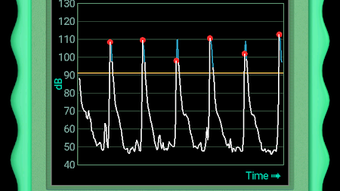
- Graphical Sound Level Display – Visualizes sound intensity over time with a dynamic graph, highlighting instances when a clap is registered, enhancing user confidence in detection accuracy.
- Adjustable Measurement Speed – Offers ten selectable frequencies ranging from 0.5 Hz to 450 Hz, allowing users to fine-tune detection sensitivity based on event pace or desired precision.
- Trigger Reset Settings – Includes configurable reset options to prevent double-counting, improving reliability during rapid or overlapping sound events.
- Offline Functionality – Operates without internet access, ensuring consistent performance in environments with limited or no connectivity.
These features enable practical applications such as counting audience applause at a concert, measuring the frequency of handclaps during a training session, or logging sound events during field research. The adjustable detection speed allows users to adapt the app for slow-paced events like religious ceremonies or fast-paced activities like dance routines. The visual feedback provided by the graph helps users verify that the app is functioning correctly and that counts are being registered accurately. This makes Clap Counter a versatile tool across both personal and professional use cases.
User Interface, Workflow & Performance
The user interface of Clap Counter is minimalistic and focused on core functionality, prioritizing ease of access and clarity. The main screen displays the counter value, a real-time graph of sound levels, and controls for adjusting detection settings. Navigation is straightforward, with all essential functions accessible from the primary view. Users can modify the measurement speed and reset parameters with simple tap interactions. The workflow is designed for immediate use—once launched, the app begins monitoring sound without requiring complex setup. The developer did not specify resource usage details, so performance behavior under sustained use remains unverified. However, given the app’s small file size of 2.8 MB, it is likely optimized for low memory and CPU consumption. Stability is expected to be high, as the app relies on native Android audio processing without additional dependencies. No reported crashes or performance issues were mentioned in the provided information. The interface remains responsive during operation, and the visual feedback is updated in real time, contributing to a smooth user experience.
Compatibility & System Requirements
Clap Counter is designed for Android devices and is compatible with the Android operating system. The app’s version is listed as 1.1.4, and it has a file size of 2.8 MB, indicating a lightweight footprint. The developer did not provide specific details about minimum hardware requirements or supported Android versions. Compatibility information is limited to the general platform, and exact device support cannot be confirmed. Users are advised to ensure their device has a functional microphone, as this is essential for the app’s core functionality. The app does not require a specific processor speed or RAM amount, but performance may vary depending on the device’s audio input capabilities. The developer did not specify whether the app supports tablets or wearables. Installation is straightforward, and the app runs directly on the device without additional software dependencies.
Pros and Cons
Pros
- Free to download and use with no in-app purchases or ads mentioned
- Minimal file size (2.8 MB) ensures quick installation and low storage usage
- Real-time graph provides visual confirmation of sound detection events
- Adjustable detection speed allows customization for various use cases
- Offline operation ensures privacy and uninterrupted performance
Cons
- Exact system requirements were not listed, making compatibility assessment difficult
- Performance under prolonged use was not specified
- Limited feedback on accuracy in noisy environments
- No option for export or data logging of recorded events
- Interface may lack advanced customization for power users
FAQ Section
Is Clap Counter available for free?
Yes, Clap Counter is offered at no cost on the Google Play Store. There are no reported in-app purchases or subscription fees.
Does Clap Counter require an internet connection?
No, the app operates entirely offline. It uses the device’s microphone and local processing, making it suitable for use in areas with no internet access.
Can I use Clap Counter on tablets?
The developer did not specify tablet compatibility. While the app may function on larger screens, official support for tablets was not confirmed.
How accurate is the clap detection?
The app detects sound events based on user-defined thresholds and adjustable sensitivity. Accuracy may vary depending on ambient noise and microphone quality, but trigger reset settings help minimize double-counting.
Is the app safe to install?
As a free app from keuwlsoft on the Google Play Store, Clap Counter is considered secure. It does not request excessive permissions and operates locally on the device.
Final Thoughts
Clap Counter delivers a focused and efficient solution for counting claps or other sound events on Android devices. Its intuitive interface, customizable detection settings, and real-time visual feedback make it a reliable tool for both casual and professional use. The app’s lightweight design and offline functionality enhance its accessibility and privacy. While some technical details such as system requirements and long-term performance are not disclosed, the core features are well-executed and practical. It is ideal for event organizers, educators, researchers, and anyone needing a simple way to track auditory signals. With its free availability and straightforward operation, Clap Counter stands out as a smart choice for sound event tracking. Download Clap Counter now.




.png)


